Executive Summary
OCR vs document intelligence vs RAG is not a contest between
interchangeable tools. It is an architecture decision. OCR converts
scanned documents, PDFs, and images into machine-readable text. Document
intelligence extracts structured fields, tables, classifications, and
workflow-ready data from documents. RAG retrieves relevant content from
a document collection and uses an LLM to generate grounded answers. For
many enterprises, the right answer is hybrid: use OCR or document
intelligence to normalize the source documents, then use retrieval and
generation to support search, summarization, and decision support.
Choose the architecture by business outcome, not vendor hype.
Direct answer: OCR is best when a business needs to
convert scanned documents into machine-readable text. Document
intelligence is best when the business needs structured fields, tables,
classifications, and workflow-ready data from documents. RAG is best
when users need grounded search, summarization, or question answering
over a larger document corpus. Many enterprises need a hybrid design
that uses OCR or document intelligence for ingestion and RAG for
knowledge access.
Key Takeaways
- OCR digitizes documents; it does not automatically understand
business meaning.- Document intelligence extracts structured information from recurring
business documents.- RAG helps users ask questions over document collections, but it
depends on clean ingestion and retrieval.- Hybrid architectures are often the best fit for regulated or
document-heavy enterprises.- Vendor choice should follow architecture selection, not the other
way around.- Governance, access control, evaluation, retention, and human review
are production requirements.
Why OCR vs RAG Is
the Wrong Starting Question
The wrong question is: “Should we use OCR or RAG?”
The better question is: “What business outcome does the document
workflow need?”
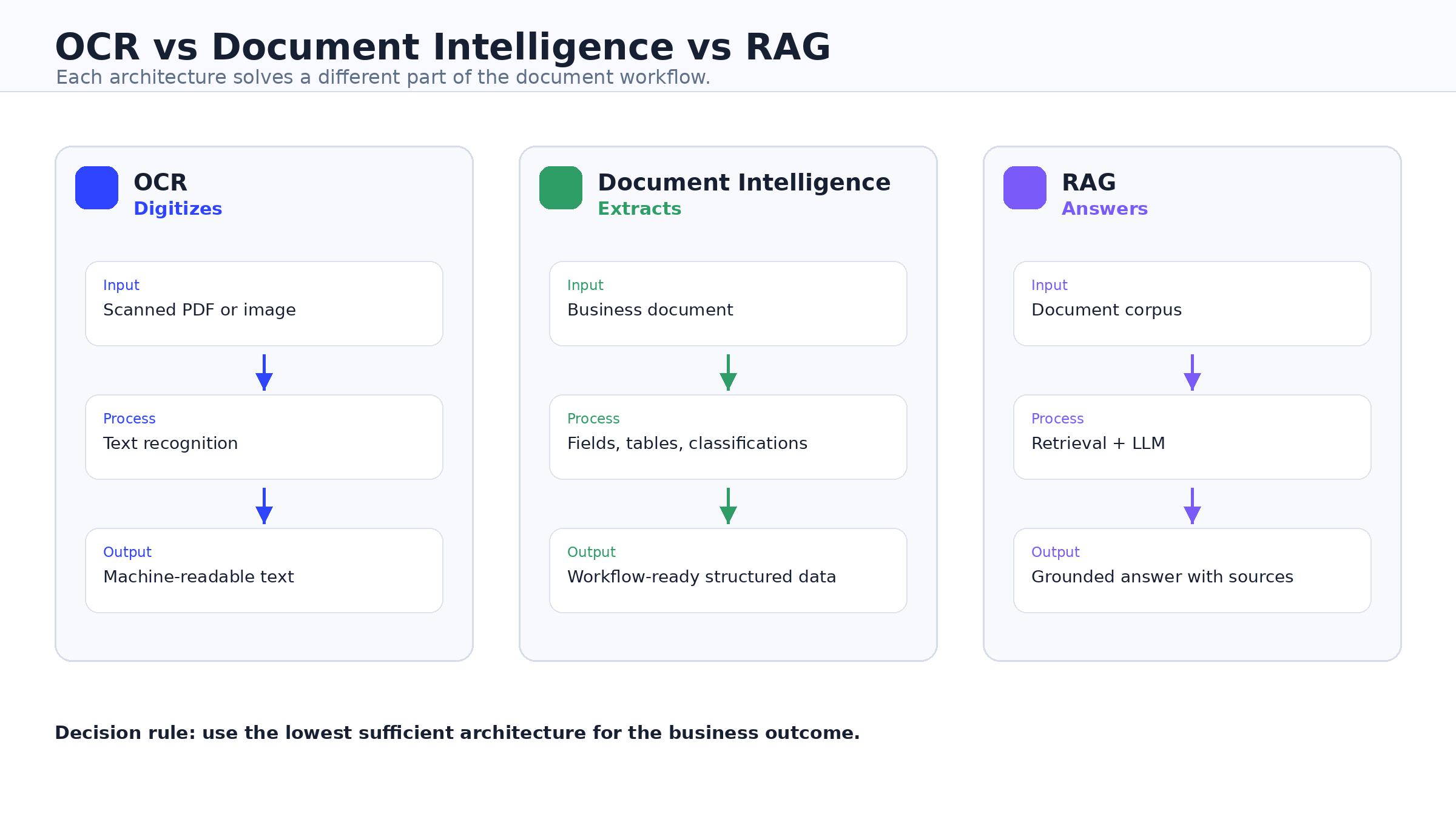
OCR, document intelligence, and RAG solve different layers of the
document problem. OCR digitizes. Document intelligence extracts. RAG
answers. Treating them as substitutes leads to weak pilots, poor
retrieval quality, inaccurate automation, and unclear ROI.
Microsoft
Azure AI Document Intelligence, Google
Document AI, and AWS
Textract focus heavily on turning documents into text, structure,
fields, tables, classifications, and usable data. RAG systems, by
contrast, retrieve relevant content and use a model to generate an
answer. The original RAG paper defines the pattern as combining a
model’s parametric memory with external non-parametric memory retrieved
from an index (Lewis et al.,
2020).
That means a document-heavy enterprise may need more than one layer.
A scanned invoice may need OCR. An accounts payable workflow may need
document intelligence. A finance analyst asking policy questions across
contracts, SOPs, and exceptions may need RAG. A mature enterprise
workflow may need all three, connected carefully.
What OCR Does Best
OCR converts scanned documents, images, and PDFs into
machine-readable text. It is the right starting point when the primary
problem is digitization: old paper archives, scanned forms, photographed
receipts, faxes, or image-only PDFs.
OCR is useful when the business wants searchable documents, text
extraction, indexing, or downstream processing. It can reduce manual
transcription and make legacy records usable by software. Modern OCR
platforms may also include handwriting recognition, layout information,
confidence scores, or coordinates, depending on the service. AWS, for
example, describes Textract as a service that detects text and can also
analyze documents for tables and key-value pairs (AWS Textract
documentation).
But OCR is not the same as understanding. If the output the business
needs is an invoice total, claimant name, policy number, clause type,
tax field, or loan document category, plain text is not enough. The
system needs business structure, validation, and a clear path into
downstream systems.
Use OCR when the KPI is digitization cost, searchable text coverage,
or records accessibility. Move beyond OCR when the KPI is touchless
processing, field accuracy, exception reduction, or workflow
automation.
What Document Intelligence
Adds
Document intelligence goes beyond text recognition. It extracts
fields, tables, key-value pairs, layout, classifications, and entities
that business systems can use.
This is the better fit for recurring enterprise documents: invoices,
bank statements, contracts, claims, insurance forms, KYC documents,
healthcare intake packets, tax forms, lending packages, and government
applications. Google describes Document AI as a platform that transforms
unstructured documents into structured data suitable for analysis and
consumption, with processors for OCR, parsing, classification,
splitting, and extraction (Google
Document AI overview). Microsoft describes Azure AI Document
Intelligence as a tool for automating document data processing through
document analysis, prebuilt models, custom extraction, and
classification (Microsoft
Learn).
The operational value is not merely “AI read the document.” The value
is that extracted data can feed an ERP, CRM, claims platform, case
system, data warehouse, or human-review queue.
Document intelligence is usually the correct architecture when
documents are part of a repeatable business process and the output must
be validated. It should include confidence thresholds, exception
handling, human review for uncertain fields, and auditability.
What RAG Does Best
RAG is best for knowledge access.
In a RAG architecture, documents or knowledge sources are parsed,
chunked, embedded, indexed, retrieved, and then supplied to an LLM as
context for an answer. IBM describes RAG as a technique that improves
LLM responses by fetching data from external sources, while OpenAI
describes retrieval as semantic search over data using vector stores
that can chunk, embed, and index uploaded files (IBM
watsonx RAG article, OpenAI
retrieval guide).
RAG is useful when the user wants to ask questions across policies,
manuals, contracts, case files, knowledge bases, research documents,
customer records, SOPs, or internal documentation. It can support
summaries, grounded answers, clause discovery, policy lookup, case
review, and employee support.
RAG is not a replacement for OCR. If the source files are scanned
images, the retrieval layer still needs usable text. RAG is also not a
replacement for document intelligence when a workflow requires
deterministic fields, validation rules, and system-of-record
updates.
RAG depends on ingestion quality. Bad OCR, weak metadata, poor
chunking, missing access control, and untested retrieval will produce
weak answers no matter how strong the model is.
OCR vs Document
Intelligence vs RAG
| Dimension | OCR | Document Intelligence | RAG |
|---|---|---|---|
| Main output | Machine-readable text | Structured business data | Grounded answers and summaries |
| Best for | Digitization and searchable archives | Workflow automation and extraction | Knowledge access and document Q&A |
| Typical input | Scans, PDFs, images, faxes | Recurring forms and semi-structured documents | Policies, manuals, contracts, case files, knowledge bases |
| Accuracy concern | Text recognition | Field extraction, classification, validation | Retrieval relevance and answer faithfulness |
| Cost drivers | Pages, image quality, OCR features | Pages, models, validation, human review | Tokens, embeddings, storage, retrieval, evaluation |
| Governance need | Access and retention | Confidence thresholds, exception handling, audit | Retrieval permissions, citations, retention, hallucination monitoring |
| When not enough | Business meaning is required | Open-ended Q&A is required | Deterministic fields are required |
The simplest way to explain the difference is this:
OCR makes documents readable by software. Document intelligence makes
documents usable by business systems. RAG makes document collections
usable by people asking questions.
That distinction matters because the wrong architecture creates false
confidence. A searchable archive is not an automated finance workflow. A
chatbot over policy documents is not a claims intake system. An LLM
answer is not a validated field extraction pipeline.
When Enterprises
Need a Hybrid Architecture
Many enterprises do not need only OCR, only document intelligence, or
only RAG. They need a hybrid architecture.
Hybrid does not mean using every AI tool everywhere. It means using
deterministic extraction where structure matters and retrieval-based
generation where knowledge access matters.
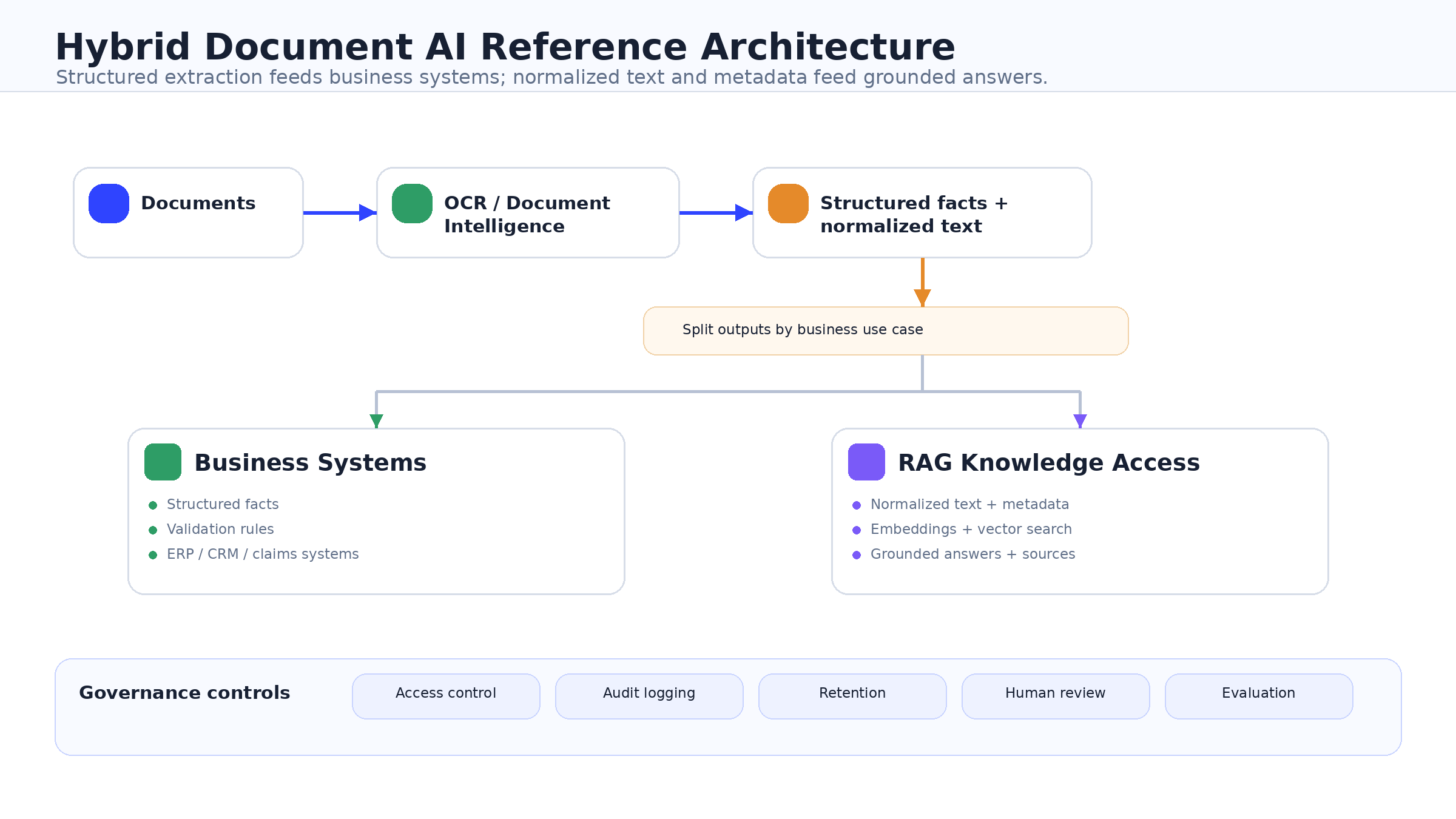
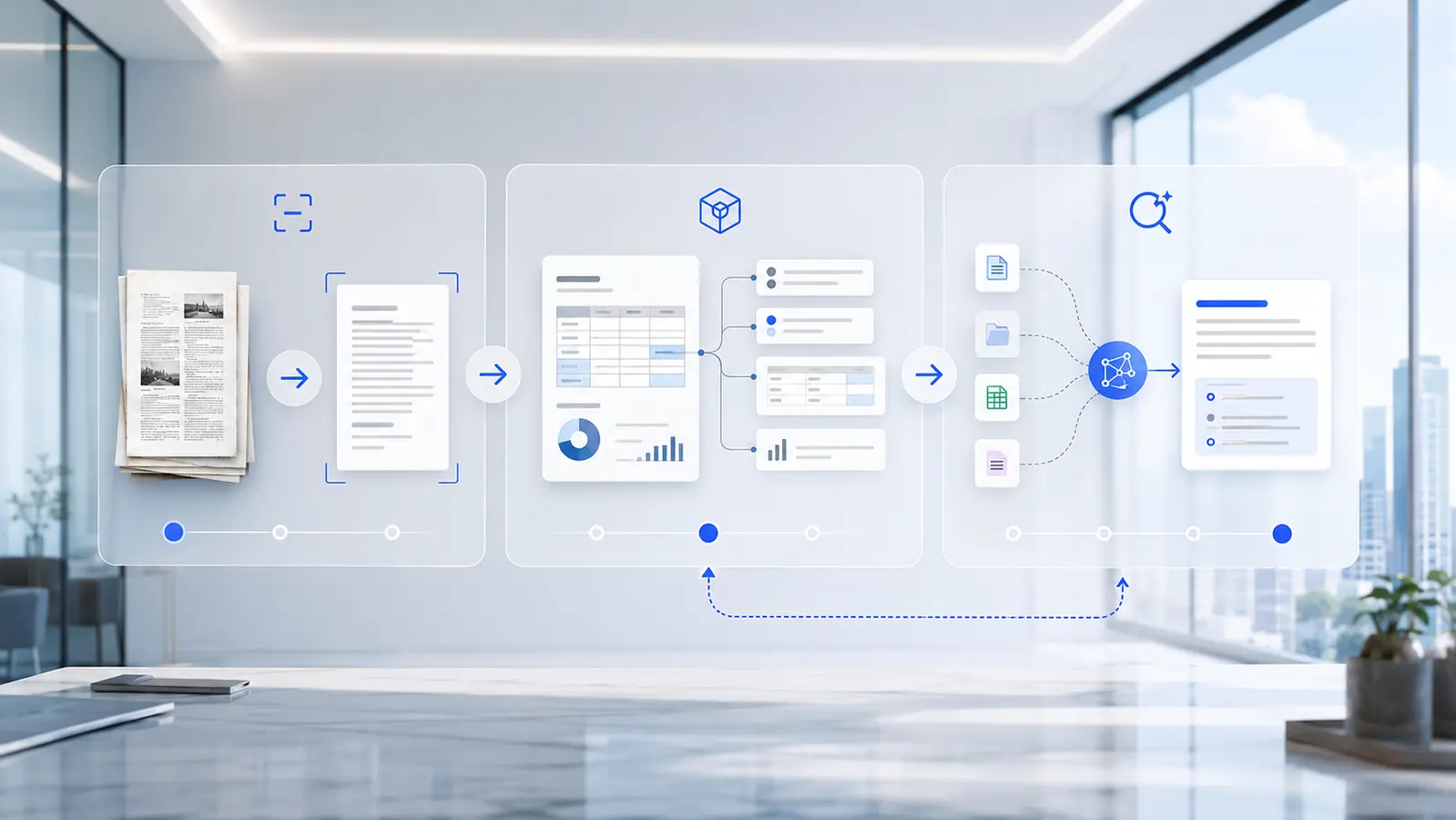
A common hybrid pattern looks like this:
- Documents enter from email, scanners, portals, repositories, or file
shares. - OCR and document intelligence extract text, layout, fields, tables,
classifications, and metadata. - Structured outputs flow into ERP, CRM, claims, finance, legal, or
case systems. - Normalized text and metadata flow into a retrieval index.
- RAG supports grounded search, summaries, and Q&A over the
document collection. - Governance controls apply across source files, extracted fields,
indexes, prompts, generated answers, and retention.
This pattern is especially relevant when structured facts and
narrative evidence coexist.
In insurance, document intelligence can extract claim facts while RAG
helps adjusters interpret policy and case history. In legal, document
intelligence can classify contracts and extract clauses while RAG helps
lawyers search matter files. In healthcare, extraction can capture
intake or insurance-card data while RAG supports coverage or
prior-authorization research. In finance, invoice fields may feed AP
automation while RAG helps analysts answer questions about approval
policies and exceptions.
How the Choice Changes by
Industry
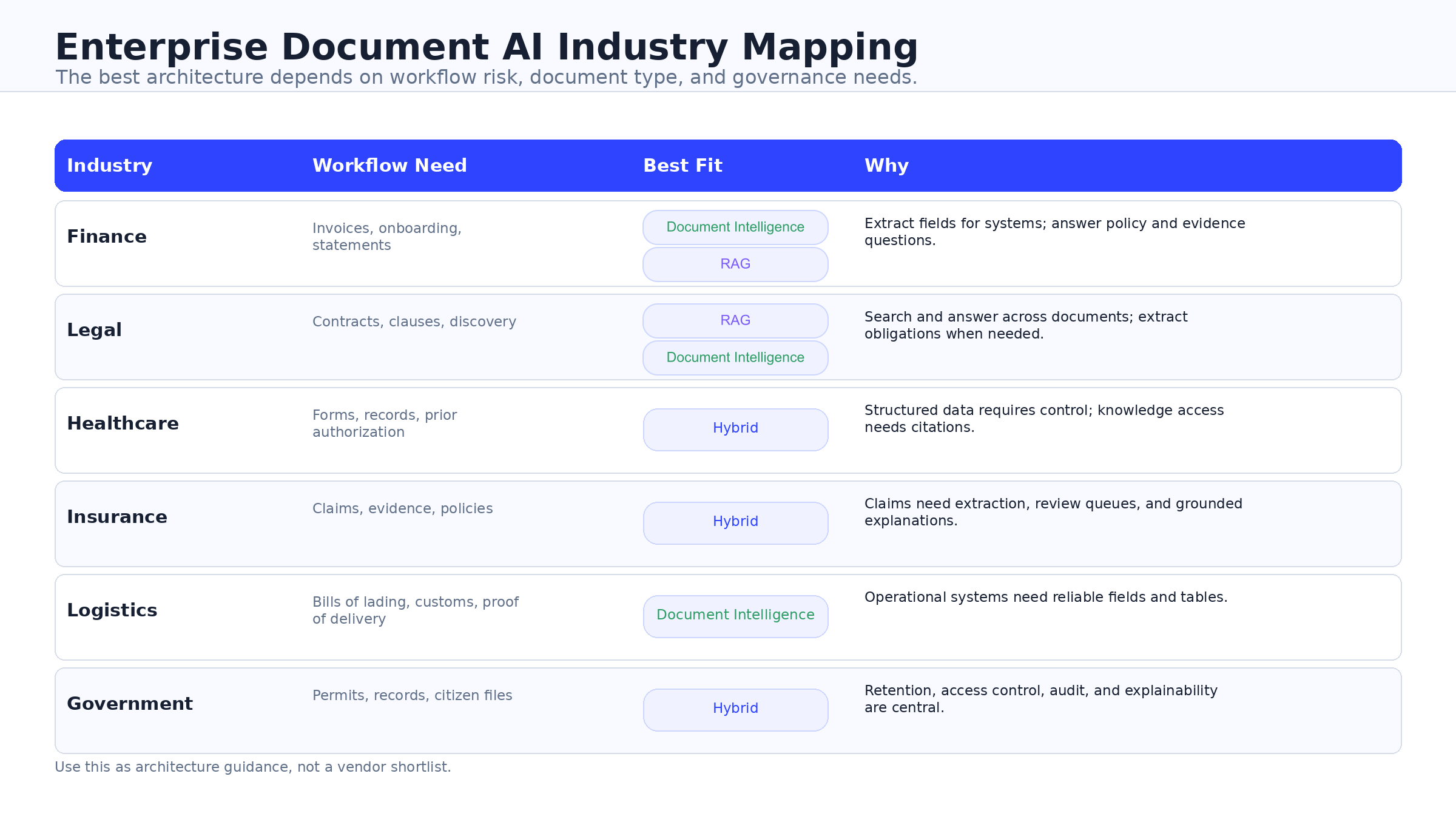
The same architecture question appears differently across
industries.
| Industry | Common Document Problem | Likely Architecture |
|---|---|---|
| Finance | Invoices, bank statements, expenses, approvals, reconciliations | Document intelligence plus RAG for policy and exception support |
| Legal | Contracts, clauses, matter files, obligations, discovery records |
Hybrid architecture for extraction plus grounded review |
| Healthcare | Intake packets, insurance cards, referrals, prior authorization, policy documents |
Hybrid architecture with strict access, review, and retention |
| Insurance | Claims packets, FNOL, repair estimates, identity documents, policy interpretation |
Document intelligence plus RAG for adjuster support |
| Logistics | Bills of lading, customs documents, proof of delivery, carrier paperwork |
OCR or document intelligence first, then RAG for SOP and exception lookup |
| Government | Forms, permits, tax records, benefits documents, case files | Document intelligence or hybrid architecture with strong auditability |
This is why a single vendor demo can be misleading. The same
“document AI” label may hide very different requirements for validation,
access control, integration, and review.
Enterprise Decision
Framework
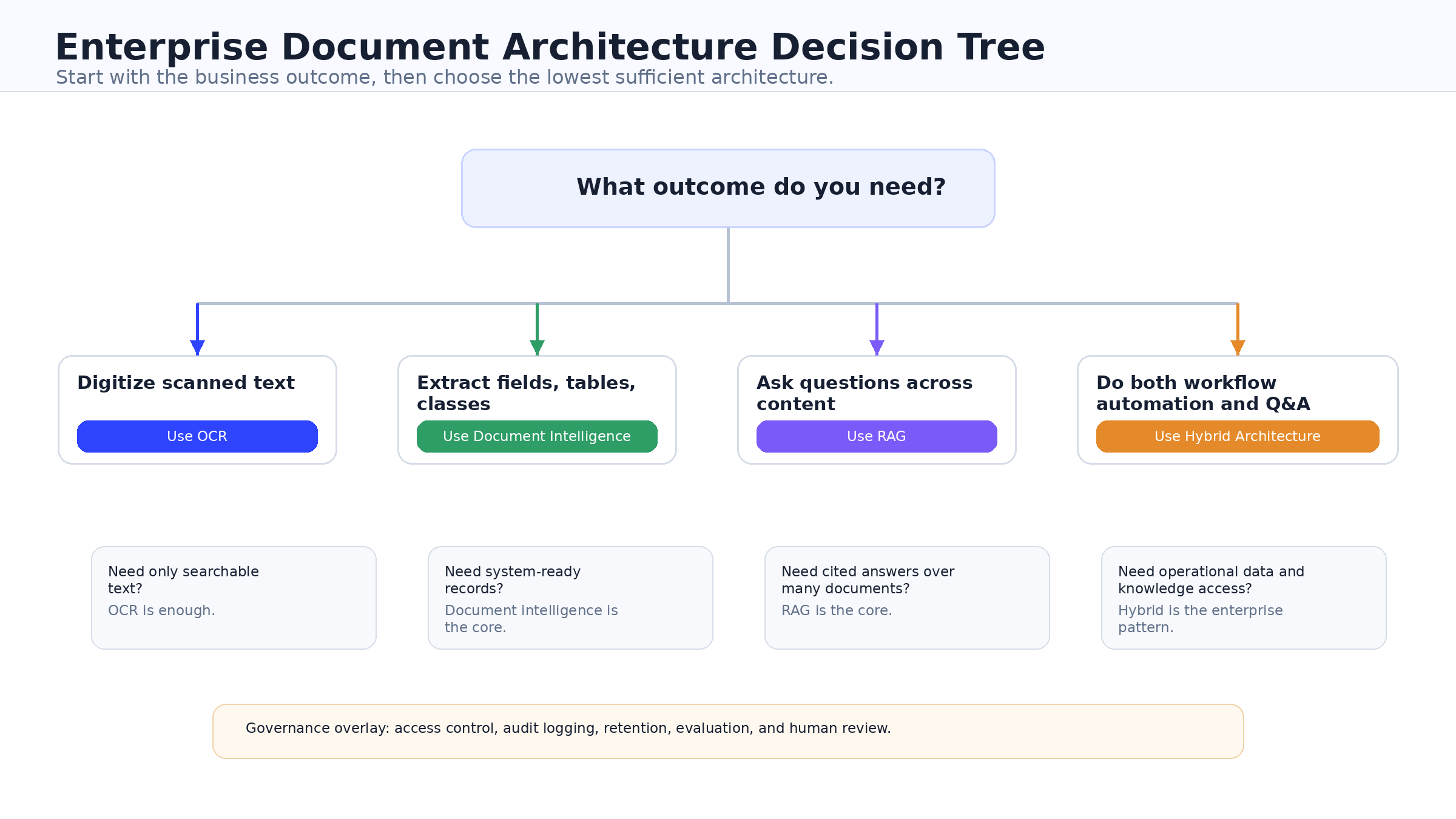
Use the business KPI to choose the architecture:
| Business Need | Recommended Architecture | Why |
|---|---|---|
| Convert scans into searchable records | OCR | The main outcome is readable text |
| Extract invoice, claims, KYC, tax, contract, or form fields | Document intelligence | The business needs structured data and validation |
| Ask questions across policies, SOPs, contracts, cases, or manuals |
RAG | The business needs grounded knowledge access |
| Automate document workflows and support document Q&A | Hybrid | The business needs both structured extraction and retrieval |
| Operate in regulated workflows | Document intelligence or hybrid | The architecture must include validation, audit, access control, retention, and review |
If the KPI is digitization cost per page, start with OCR.
If the KPI is touchless processing rate, field accuracy, or exception
reduction, use document intelligence.
If the KPI is knowledge access, employee support, policy Q&A,
case summarization, or clause discovery, use RAG.
If the KPI crosses structured automation and unstructured knowledge
work, use a hybrid architecture.
That framework is more useful than asking which vendor has the most
AI features.
Vendor
Landscape: Which Platforms Fit Which Architecture?
Vendor choice should follow architecture choice.
| Vendor | Strongest Fit | Boundary |
|---|---|---|
| Microsoft Azure AI Document Intelligence | Enterprise document intelligence, prebuilt and custom extraction, classification, and hybrid/container options |
Strong extraction layer; broader RAG still needs search and generation architecture |
| Google Document AI | Processor-based parsing, classification, splitting, layout-aware extraction, and Google Cloud workflows |
Strong document processing layer; RAG still requires retrieval and generation design |
| AWS Textract | AWS-native OCR, forms, tables, queries, signatures, expense, ID, and lending workflows |
Strong API extraction layer; knowledge Q&A requires adjacent services |
| IBM watsonx | Governed RAG, hybrid data foundations, knowledge architecture, and enterprise AI workflows |
Strong knowledge and governance layer; not simply an OCR commodity |
| OpenAI | Retrieval, vector stores, embeddings, file search, and grounded generation applications |
Strong application layer; not a deterministic OCR or IDP replacement |
| Anthropic | Citation-aware grounded answers and tool-fed knowledge workflows |
Strong answer layer; still needs upstream extraction and indexing |
The nuance matters. Microsoft, Google, and AWS are often evaluated
for document ingestion and extraction. IBM, OpenAI, and Anthropic are
often evaluated for knowledge, retrieval, generation, and answer
experience. There is overlap, but these are not interchangeable
decisions.
Anthropic’s search result blocks and citations are relevant for RAG
applications that need source attribution (Anthropic
search results documentation, Anthropic
citations documentation). OpenAI’s file search and retrieval tools
are relevant when teams want managed vector stores and semantic search
over uploaded content (OpenAI
file search, OpenAI
retrieval).
The right vendor question is not “which platform is best?” It is
“which platform fits the layer we are designing?”
Governance and Security
Requirements
Document AI architecture is a production system, not a demo
feature.
At minimum, enterprises should define controls for:
- Data classification.
- PII minimization.
- Encryption at rest and in transit.
- Key management.
- Role-based access control.
- SSO.
- Audit logging.
- Retention and deletion.
- Human review for uncertain or high-impact outputs.
- Model-output monitoring.
- Retrieval access control.
- Raw file and vector-store lifecycle management.
- Golden-set evaluation for extraction, retrieval, and answer
faithfulness.
The NIST AI
Risk Management Framework is useful because it frames AI risk across
design, development, use, and evaluation. ISO/IEC 42001 is also relevant
because it specifies requirements for establishing and improving an AI
management system within an organization (ISO/IEC 42001).
For document-heavy systems, governance must cover more than the
model. It must cover source documents, extracted data, document
classifications, retrieval indexes, embeddings, prompts, generated
answers, human decisions, and downstream business effects.
The biggest risk is not only hallucination. It is an end-to-end
architecture that cannot prove where data came from, who accessed it,
why an answer was generated, which source was used, or when content
should be deleted.
Build vs Buy:
What Enterprises Should Actually Own
Do not model TCO only as page price or token price.
The real cost stack includes:
- Source clean-up.
- Document taxonomy.
- Labeled data.
- Parser tuning.
- Vector-store storage.
- Model inference.
- Human review.
- Reprocessing.
- Governance controls.
- Logging and observability.
- Support and change management.
Buy common OCR and parser infrastructure when the workflow is
standardized. Build proprietary taxonomy, validation logic, integration
rules, metadata strategy, and evaluation pipelines where the workflow is
differentiating or regulated.
Buy foundation models and retrieval tooling where speed matters. Own
governance, prompt contracts, access boundaries, evidence logging,
retention policy, and operating process where control matters.
That split usually creates better time to value without surrendering
the architecture.
Common Mistakes to Avoid
- Confusing OCR with understanding. OCR can create
text, but it does not automatically extract validated business
meaning. - Starting with a chatbot before fixing ingestion.
Bad source text, weak metadata, and poor chunking will damage RAG
quality. - Using an LLM where deterministic extraction is
required. Regulated field extraction needs validation,
confidence thresholds, and review. - Skipping evaluation. Build golden sets for
extraction accuracy, retrieval relevance, and answer faithfulness. - Ignoring retention. Raw files, extracted fields,
indexes, vector stores, and generated outputs all need lifecycle
rules. - Comparing vendors before defining the workflow.
Vendor selection before architecture selection creates expensive
confusion. - Treating RAG as a hallucination cure. RAG can
improve grounding, but it does not remove model risk.
A Practical Adoption Path
Start narrow.
Choose one high-volume, high-friction workflow. Measure the current
cost, cycle time, error rate, and exception rate. Classify the document
types and define the exact outputs the business needs.
Then choose the architecture:
- OCR for text digitization.
- Document intelligence for structured extraction.
- RAG for knowledge access.
- Hybrid for workflows that need both.
Build a controlled pilot with evaluation criteria. Add human review,
access control, logging, and retention from the beginning. Integrate
with operational systems only after accuracy, retrieval quality, cost,
and controls are proven.
Expansion should follow evidence. If the pilot cannot show better
throughput, lower manual effort, better search quality, or clearer
governance, scaling it will not fix the problem.
How Blockchain Central Helps
Blockchain Central helps enterprises choose the right document
architecture before they commit to a vendor or pilot.
Our work can include:
| Offer | Outcome |
|---|---|
| Document Architecture Diagnostic | Map workflows to OCR, document intelligence, RAG, or hybrid and produce a decision memo |
| IDP Pilot Accelerator | Build a controlled extraction pilot with validation and human review |
| Grounded Enterprise RAG Accelerator | Build a citation-aware assistant with retrieval evaluation and access controls |
| Governance and Residency Blueprint | Design retention, access, encryption, audit, and evaluation controls |
| Managed Optimization Retainer | Improve extraction, retrieval, prompts, cost, and exception handling over time |
The goal is not to force AI into every document process. The goal is
to identify where document AI creates measurable value and where
deterministic automation, human review, or a simpler workflow is the
better decision.
Book an enterprise document architecture assessment before choosing
your document AI vendor.
Frequently Asked Questions
What
is the difference between OCR and document intelligence?
OCR converts scanned documents, PDFs, or images into machine-readable
text. Document intelligence goes further by extracting structured
fields, tables, key-value pairs, classifications, and workflow-ready
data. OCR is enough when the goal is searchable text. Document
intelligence is better when documents feed business systems or
operational workflows.
What
is the difference between document intelligence and RAG?
Document intelligence prepares structured outputs from documents,
such as invoice totals, account numbers, claim fields, tables, or
document types. RAG retrieves relevant content from a document
collection and uses an LLM to generate grounded answers. Document
intelligence is for extraction and automation; RAG is for knowledge
access and Q&A.
Can RAG replace OCR?
No. RAG does not replace OCR when source files are scanned images,
photographed documents, faxes, or PDFs without usable text. OCR or
document intelligence is still needed to normalize those documents
before retrieval can work reliably.
Can RAG replace document
intelligence?
RAG should not replace document intelligence when the workflow
requires deterministic fields, validation, confidence thresholds, and
system-of-record updates. RAG is useful for answering questions over
content, but document intelligence is better for workflow-ready
extraction.
When should a business use
OCR?
Use OCR when the main goal is digitization: converting scanned or
image-based documents into searchable, machine-readable text. It is
appropriate for archives, backfile scanning, basic ingestion, and legacy
paper conversion.
When should a
business use document intelligence?
Use document intelligence when documents need to become structured
business data. Common examples include invoices, claims, contracts,
identity documents, healthcare intake forms, tax documents, bank
statements, and public-sector forms.
When should a business use
RAG?
Use RAG when users need grounded answers, summaries, or search across
a larger document collection. Good examples include internal policy
assistants, contract Q&A, legal matter search, SOP support, case
summarization, and analyst research.
When does an
enterprise need a hybrid architecture?
An enterprise needs a hybrid architecture when it requires both
structured automation and knowledge access. Document intelligence can
extract fields and classifications for operational systems, while RAG
can support grounded question answering over policies, contracts, cases,
and other document collections.
What
is the safest architecture for regulated document workflows?
There is no universally safest architecture. Regulated workflows
usually need validation, access control, audit logging, retention, human
review, and evaluation. In many cases, a hybrid architecture is
appropriate because it separates deterministic extraction from grounded
knowledge access.
Should
a company choose a vendor before choosing an architecture?
No. A company should define the business outcome and architecture
first, then choose the vendor stack. Vendor-first decisions often lead
to overbuilt pilots, weak governance, or tools that solve the wrong
layer of the document problem.
Conclusion
OCR, document intelligence, and RAG are all useful, but they are
useful for different reasons.
OCR digitizes. Document intelligence extracts. RAG answers.
The enterprise decision should start with the workflow: what enters
the system, what output is required, who relies on that output, what
risk is attached, and which systems must consume the result. Once that
is clear, vendor selection becomes much easier.
Choose the architecture before choosing the vendor.